How QR Codes Work Under the Hood: Reed-Solomon Error Correction, Mask Patterns, and Matrix Encodings
Explore the computer science and math behind Quick Response codes. Learn 1:1:3:1:1 finder patterns, Galois field error correction, mask formulas, and URI schemes.
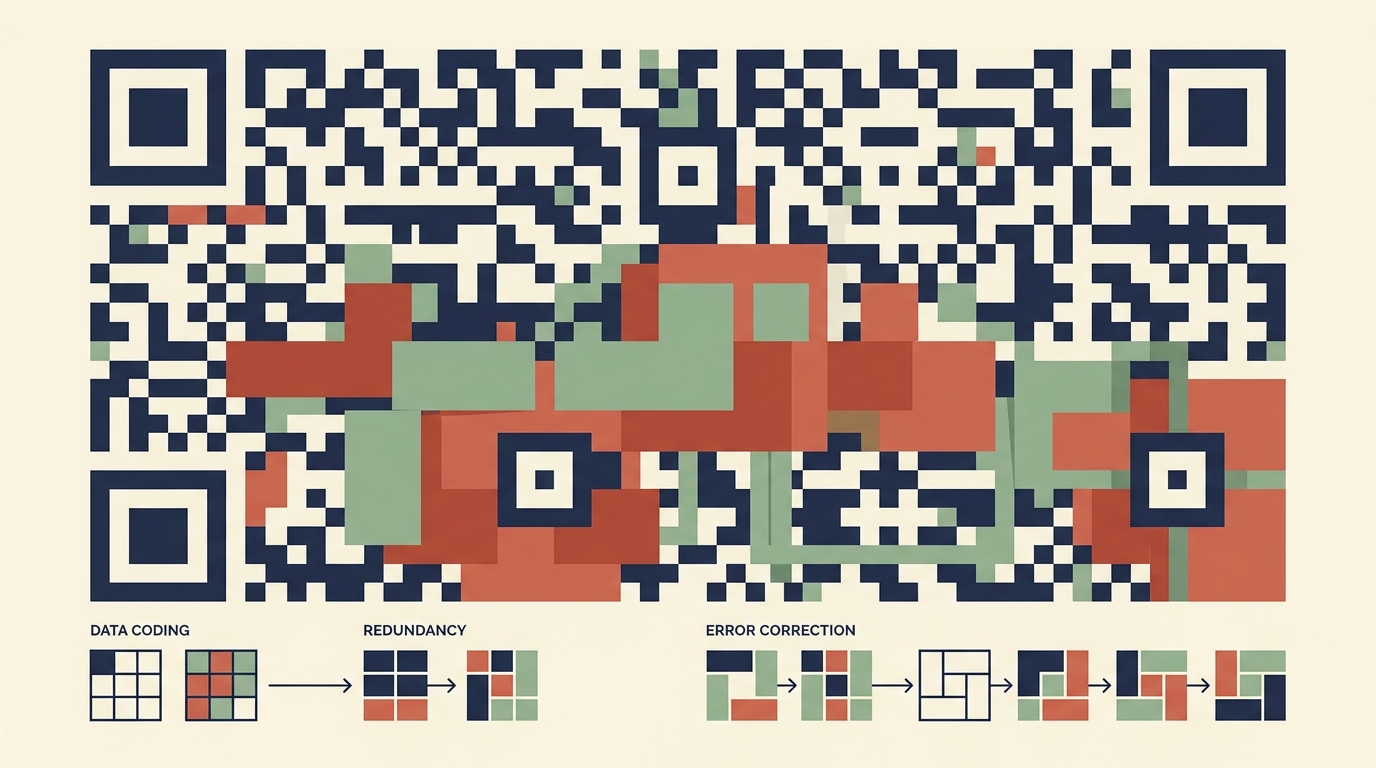
You point your phone at a crumpled coffee cup or a billboard fifty feet away, and within milliseconds, a browser opens to the exact URL.
Even if someone tears off a corner, spills sauce across the matrix, or pastes a logo in the dead center, your camera scanner still reads the payload instantly without corruption.
In this guide, you will learn how Quick Response (QR) codes work from first principles: the geometric ratios behind optical finder patterns, Reed-Solomon polynomial math over Galois fields, the eight penalty mask formulas, and standard URI formats.
💡 Key Takeaways#
- The 1:1:3:1:1 Finder Pattern: Three corner squares use a strict ratio of black-white-black-white-black modules. Scanners detect this signature at any rotation angle in a single raster scan.
- Reed-Solomon Redundancy: QR codes use Galois Field arithmetic GF(2^8) to generate error-correcting codewords. Higher levels (Q and H) recover data even when 25% to 30% of the surface is destroyed.
- Mask Evaluation Algorithm: Raw data can create misleading accidental finder patterns or long blank rows. Encoders apply 8 mathematical masks (like
(row + col) % 2 == 0) and pick the mask with the lowest penalty score. - Four Encoding Modes: Payloads select the most compact bit packing: Numeric (3.33 bits/char), Alphanumeric (5.5 bits/char), Byte (8 bits/char), or Kanji (13 bits/char).
- URI Action Schemes: Standard prefix formats (
WIFI:,BEGIN:VCARD,mailto:,tel:) trigger native mobile operating system actions without intermediate redirection servers.
1. Matrix Anatomy: Finder, Alignment, and Timing Patterns#
A QR code is not a random grid of black and white squares. It follows a rigid architectural layout:
The 1:1:3:1:1 Ratio#
In 1994, Masahiro Hara analyzed thousands of printed materials to find a frequency ratio that almost never appears in natural text or packaging:
[Black 1x] [White 1x] [Black 3x] [White 1x] [Black 1x]
No matter the angle, slant, or distance of your smartphone camera, when horizontal scanlines detect a 1:1:3:1:1 transition, the image processing pipeline locks onto a finder pattern.
2. Reed-Solomon Error Correction Over GF(2^8)#
How does a QR code survive a logo stamped in the middle or physical damage to the paper?
The secret is Reed-Solomon error correction, an algebraic technique originally created for deep space communications and CDs.
The 4 Standard Error Correction Levels:#
| Level | Recovery Capacity | Trade-Off | Best Use Case |
|---|---|---|---|
| L (Low) | ~7% of codewords | Smallest matrix, highest data density | Digital screens, short URLs |
| M (Medium) | ~15% of codewords | Balanced density (Standard default) | General print, packaging |
| Q (Quartile) | ~25% of codewords | Larger matrix | Industrial labels, posters |
| H (High) | ~30% of codewords | Densest pattern, highest resilience | QR codes with custom center logos |
Because Reed-Solomon operates over a finite field of 256 elements ($GF(2^8)$), arithmetic addition is equivalent to bitwise XOR (^). If $2t$ parity codewords are appended, the decoder can detect and fix up to $t$ corrupted bytes at unknown positions.
3. The 8 Mask Patterns: Preventing Optical Blindness#
If your data contains repetitive sequences of zeros or ones, the QR code could produce huge blocks of white space or fake finder squares. This confuses the scanner's auto-exposure and edge detection sensors.
To prevent this, the specification defines eight mask patterns applied via bitwise XOR to the data area:
The encoder tests all eight masks against four penalty heuristics:
- N1: Penalizes runs of 5 or more identical modules in a row or column.
- N2: Penalizes 2x2 blocks of identical color.
- N3: Heavily penalizes patterns that look like 1:1:3:1:1 finder patterns elsewhere in the matrix.
- N4: Penalizes deviation from a 50/50 balance between dark and light modules.
The mask with the lowest cumulative penalty score is selected. The chosen mask ID (0 to 7) is written into the format information strip alongside the error correction level.
4. Mobile URI Schemes: Wi-Fi, vCards, and Deep Links#
QR codes do not require internet access to execute tasks. Mobile camera engines parse standardized text string schemes locally:
1. Wi-Fi Automatic Connection#
WIFI:T:WPA;S:CoffeeShop_Guest;P:SecretPassword123;;
When scanned, iOS and Android parse the WIFI: prefix and display a single prompt: "Join CoffeeShop_Guest network?"
2. Digital Business Card (vCard 3.0)#
BEGIN:VCARD
VERSION:3.0
N:Jazwinski;Joey;;;
FN:Joey Jazwinski
TITLE:Software Architect
URL:https://joeyjazwinski.com
END:VCARD
Clicking the notification imports contact details into your address book without manual typing.
5. Generating QR Codes in TypeScript#
Here is how you can generate QR code data matrices and render them cleanly using standard SVG or canvas elements:
export interface QrCodeOptions {
  content: string;
  errorCorrectionLevel: 'L' | 'M' | 'Q' | 'H';
  margin?: number;
}

// Example formatting standard Wi-Fi configuration strings
export function buildWifiQrString(
  ssid: string,
  password?: string,
  encryption: 'WPA' | 'WEP' | 'nopass' = 'WPA',
  hidden = false
): string {
  // Escape reserved characters: backslash, semicolon, comma, colon
  const escapeStr = (s: string) => s.replace(/([\\;,:"'])/g, '\\$1');

  const cleanSsid = escapeStr(ssid);
  const cleanPass = password ? escapeStr(password) : '';

  return `WIFI:T:${encryption};S:${cleanSsid};P:${cleanPass};H:${hidden ? 'true' : 'false'};;`;
}

// Example usage:
const wifiPayload = buildWifiQrString('Home_Network', 'SuperSecretCode!');
console.log('Payload ready for QR encoder:', wifiPayload);
// Output: WIFI:T:WPA;S:Home_Network;P:SuperSecretCode!;H:false;;
6. Interactive Developer Tool: Create & Download Custom QR Codes#
Need to generate production QR codes for website URLs, instant Wi-Fi login, vCard digital business cards, or email triggers?
Customize colors, margins, and error correction levels in real time right in your browser:
👉 Try the Interactive QR Code Generator
The tool runs 100% locally in your browser memory. You can download clean SVG vectors or high-resolution PNGs without any third-party tracking redirects.
Conclusion: Best Practices for Physical Printing#
- Size for Distance: Maintain a 10:1 scanning ratio (a QR code scanned from 10 feet away should be at least 1 foot wide).
- Preserve Quiet Zones: Always leave a minimum margin of 4 modules around the outer edge. Without this margin, ambient graphics ruin finder edge detection.
- Use Level H for Logos: If you place an icon or branding element in the center, always configure error correction level
Hto ensure the damaged area recovers cleanly. - Never Invert Contrast: Scanners expect dark modules on a light background. Light modules on dark paper often fail under real-world lighting.
Joey Jazwinski
Hi, I'm Joey — a software engineer building modern applications, exploring artificial intelligence, and sharing my journey through code. 🚀
Recommended Articles
View all posts →
Runtime Type Validation in TypeScript: Zod Architecture, Static Type Inference, and API Boundary Defense
Master runtime validation in TypeScript. Learn how Zod executes schema parsing, derives static types with z.infer, and protects API boundaries against invalid input.
Cryptographic Hash Functions Explained: SHA-256, Merkle-Damgård Construction, and Collision Resistance
Learn how cryptographic hash functions work under the hood. Explore SHA-256, Merkle-Damgård block processing, the avalanche effect, and HMAC integrity.

Robots.txt Architecture: Web Crawling Protocols, RFC 9309, and Search Engine Directives
Master the mechanics of web crawling protocols. Learn RFC 9309 standards, crawl budget allocation, regex path matching, and how to avoid indexing traps.